

 Türkiye (Türkçe)
 Worldwide (English)






📢 Önemli Bilgilendirme
Değerli ziyaretçilerimiz, 09.01.2026 Tarihi itibari ile alan adı,hosting ve sunucu satışlarımız aktif olacaktır. Bizleri tercih ettiğiniz için teşekkür ederiz.
İncele
You can use CloudLinux Selector to enable the Mailparse extension in PHP via Plesk.
1. Log in to your Plesk account.
2. In the right-hand sidebar, click on PHP Selector.
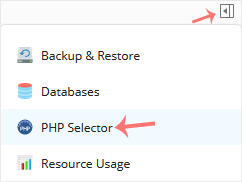
3. Click on the Extensions menu.

Note: If the Extensions page shows an error related to the native PHP version, change it to a non-native version first.
4. Checkmark Mailparse. Once enabled, it will display a success message.

The message will read that the module Mailparse is saved.
Bilgi bankasını detaylı olarak incelediniz, fakat ihtiyacınız olan bilgiyi bulamıyorsanız,
Bir Destek Talebi Oluşturun.