

 Turkey (Türkçe)
 Worldwide (English)






📢 Önemli Bilgilendirme
Değerli ziyaretçilerimiz, 09.01.2026 Tarihi itibari ile alan adı,hosting ve sunucu satışlarımız aktif olacaktır. Bizleri tercih ettiğiniz için teşekkür ederiz.
İncele
 VEATicaret
Çok Yakında! İşinizi internete taşıyalım!
PHP Scriptler
VEATicaret
Çok Yakında! İşinizi internete taşıyalım!
PHP Scriptler
 HazırYazılımlar
Mobil Uyumlu Hazır Scriptler
Profesyonel Web Tasarım
HazırYazılımlar
Mobil Uyumlu Hazır Scriptler
Profesyonel Web Tasarım
 WebTasarım
Kısa Sürede Uygun Fiyata Web Siteniz Olsun
Logo & Grafik Tasarımı
WebTasarım
Kısa Sürede Uygun Fiyata Web Siteniz Olsun
Logo & Grafik Tasarımı
 LogoTasarım
Size Özel Vektörel Logo Tasarım Hizmetimiz
LogoTasarım
Size Özel Vektörel Logo Tasarım Hizmetimiz
You can remove the published or draft post in WordPress.
1. Log in to the WordPress dashboard.
2. From the Dashboard menu, go to Posts and click on All Posts.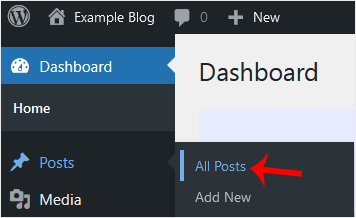
3. Hover your mouse to the post you want to remove, and click on Trash.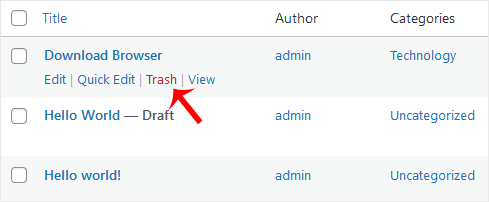
You will get a message that the post has been moved to Trash.